
 Image by Harrison Haines from Pexels
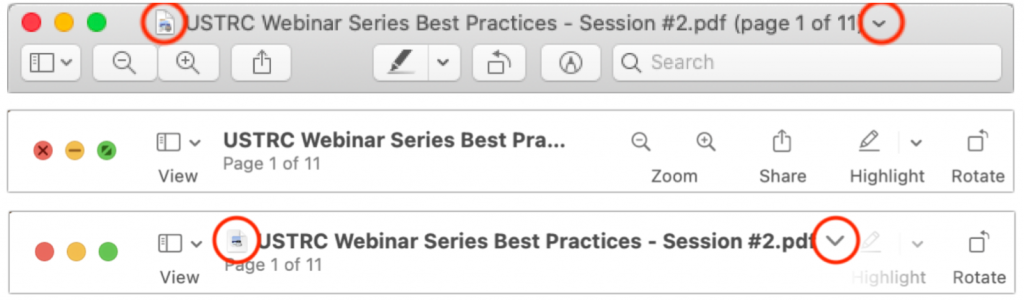
This is a twofer tip. You may not have known that every document window in macOS has long had a proxy icon in the title bar, next to the filename. The proxy icon is not just cosmetic. You can drag it to Mail to attach the document to a message, to a Web browser to upload it, or to any other location you can drag a document’s icon in the Finder (top screenshot, below, showing Preview in Catalina). You can also drag proxy icons from Finder windows to Open and Save dialogs to navigate to the location of the proxy icon and even pre-fill the filename when saving. Alas, in macOS 11 Big Sur, in at least the Finder and Preview, Apple chose to hide the proxy icon and the drop-down menu that lets you rename, tag, or move files using controls on the title bar (middle screenshot, below). Plus, the new title bar design tends to truncate file names. Happily, mousing over the filename expands the name and reveals both the proxy icon and the drop-down menu (bottom screenshot, below). Apple’s desire to reduce onscreen clutter makes usage more cumbersome than before, but all the functionality is still present.

A week might be too short if IT approval is still pending. I'd treat "keeping your old iPhone for a…
Awesome tech breakdown on "When Should You Upgrade to macOS 27 Golden Gate, iOS 27, iPadOS 27, watchOS 27, tvOS…
I’ve used Chrome’s built-in screenshot tool, but opening DevTools every time gets a bit tedious. I recommend FullPage Capture, it’s…
This is such an important reminder. I've been in meetings where an AI notetaker silently joined and recorded everything, and…
Awesome tech breakdown on "When Should You Upgrade to macOS 27 Golden Gate, iOS 27, iPadOS 27, watchOS 27, tvOS…