

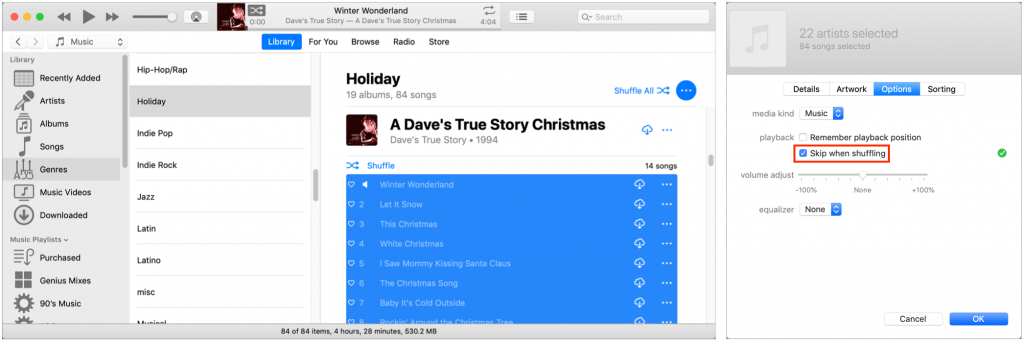
“Winter Wonderland” may be a great song to listen to when the snow flies, but if you’re sweltering in the summer heat, having it pop up while iTunes is shuffling through your music feels wrong. Happily, there’s a way to prevent holiday music from playing out of season—this trick is also useful for keeping children’s songs from shuffling alongside tracks from Abba, Beethoven, and The Clash. In iTunes, select the songs you want to prevent from being included when you shuffle all tracks, and choose Edit > Get Info. In the Get Info dialog, switch to the Options pane, select Skip When Shuffling, and click OK to save your changes. Note that the easiest way to find such music may be by selecting Genres in the sidebar and then Children’s Music or Holiday in the list that appears.
(Featured image by donnaskolnick0 from Pixabay)

Picking one style guide and living with it is the advice I give every time this question comes up, and…
Golden Gate as the macOS 27 codename is a nice callback. For mixed households I'd love a recommendation on the…
Check with your phone service provider.
Do you take orders for the new 18 or is that just at the Apple stores? Thanks
Making Wi-Fi joining as easy as scanning a QR code is exactly the kind of MacWorks tip guests actually use.