
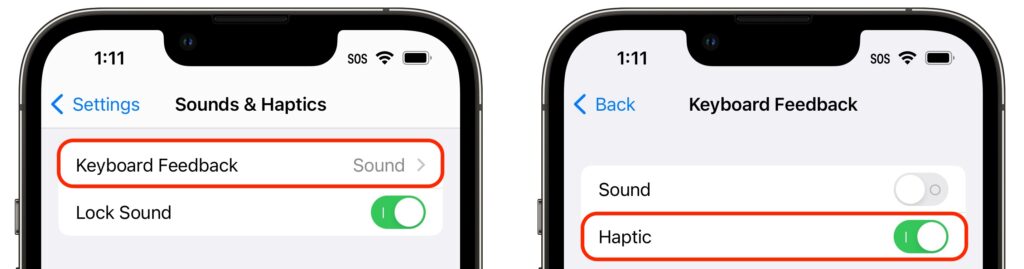
The iPhone has long been able to play clicking sounds when you tap the keys on the virtual keyboard, but that feedback, while sometimes welcome, can become annoying when you’re trying to be quiet. A new feature in iOS 16 provides haptic feedback—tiny taps you can feel in your fingertips as you tap keys on the keyboard. It’s a subtle but highly effective way of mimicking a real keyboard, and we encourage you to try it. Turn the feature on in Settings > Sounds & Haptics > Keyboard Feedback. (While you’re there, try turning off Sound; it may no longer be necessary.)
(Featured image by iStock.com/Yosi Azwan)

A week might be too short if IT approval is still pending. I'd treat "keeping your old iPhone for a…
Awesome tech breakdown on "When Should You Upgrade to macOS 27 Golden Gate, iOS 27, iPadOS 27, watchOS 27, tvOS…
I’ve used Chrome’s built-in screenshot tool, but opening DevTools every time gets a bit tedious. I recommend FullPage Capture, it’s…
This is such an important reminder. I've been in meetings where an AI notetaker silently joined and recorded everything, and…
Awesome tech breakdown on "When Should You Upgrade to macOS 27 Golden Gate, iOS 27, iPadOS 27, watchOS 27, tvOS…