
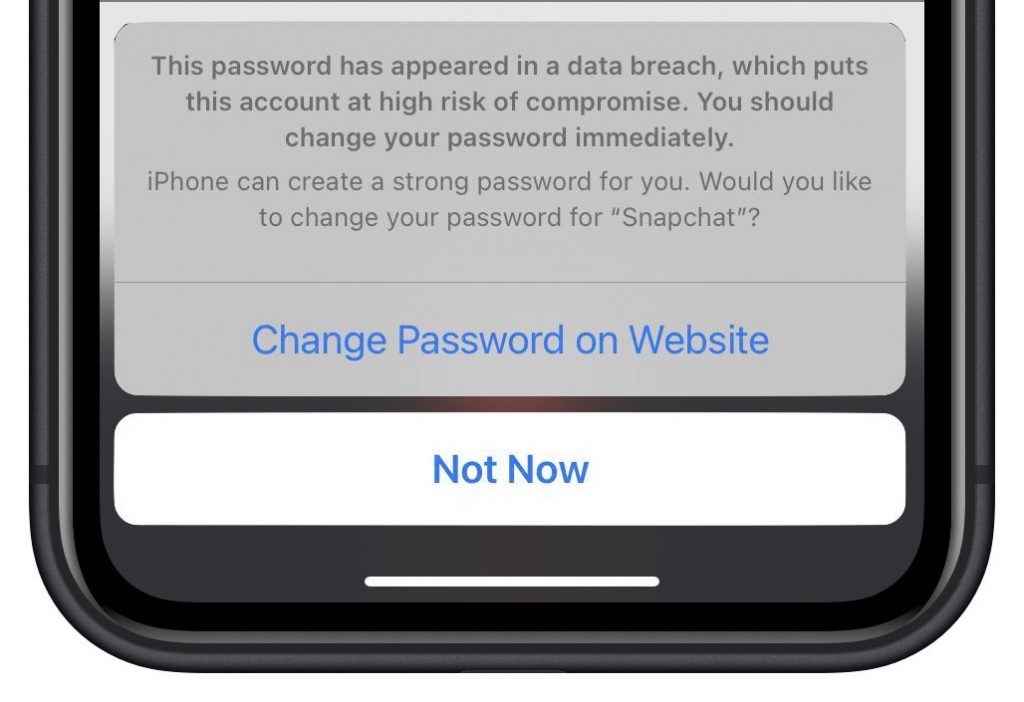
In iOS 14, Apple added a feature that warns you when one of your website passwords stored in iCloud Keychain has appeared in a data breach. We’ve fielded some questions of late from people worrying if the message is legitimate, and if so, what they should do. What has happened is that online criminals have stolen username and password data from a company, and your credentials were included in that data breach. You should indeed change your password immediately, and it’s fine to let the iPhone suggest a strong password for you. Or, if it makes you feel more comfortable, you can usually change the password in Safari on your Mac instead. Either way, make sure it’s unique—never reuse passwords across multiple sites!
(Featured image by iStock.com/LumineImages)

A week might be too short if IT approval is still pending. I'd treat "keeping your old iPhone for a…
Awesome tech breakdown on "When Should You Upgrade to macOS 27 Golden Gate, iOS 27, iPadOS 27, watchOS 27, tvOS…
I’ve used Chrome’s built-in screenshot tool, but opening DevTools every time gets a bit tedious. I recommend FullPage Capture, it’s…
This is such an important reminder. I've been in meetings where an AI notetaker silently joined and recorded everything, and…
Awesome tech breakdown on "When Should You Upgrade to macOS 27 Golden Gate, iOS 27, iPadOS 27, watchOS 27, tvOS…