

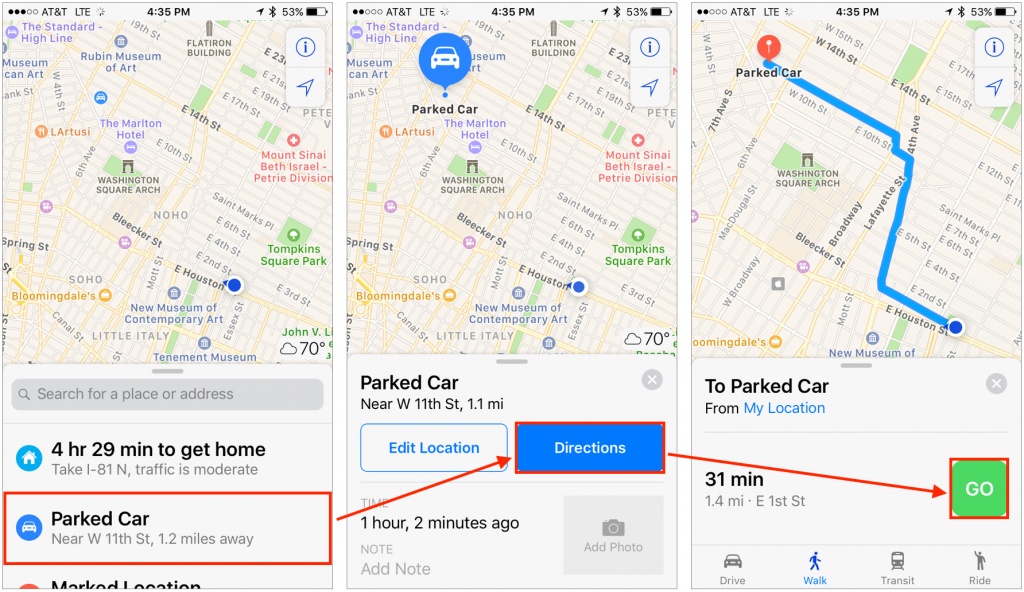
If your iPhone is connected to your car’s Bluetooth system, the Maps app will automatically records where you park your car. It even notifies you of this when you get out of the car. But how do you get back to the car after you’ve done your errands? Just bring up Maps, and you’ll see Parked Car in the recent locations list at the bottom. Tap it, tap the Directions button on the next screen, and then tap Go (tap the Walk button first if necessary). Then just follow the blue brick road and the directions that Maps gives you.

Super insightful and fresh perspective.
Well explained and easy to follow.
So glad I stumbled upon this.
Looking forward to your next post!
Truly a masterpiece of content.